


Introduction:
eSign is a service that allows users to digitally sign documents online without needing a physical USB dongle or a traditional digital signature token. In an eSign workflow, the signer is authenticated using e-KYC and the signing operation is performed on a secure back-end server operated by the eSign provider. This service is offered by licensed Certifying Authorities (CAs).
In simple terms, an eSign service issues a short-validity Signature Certificate and uses it to sign the requested data after the signer is authenticated through e-KYC. The certificate issued through eSign is typically intended for one-time signing and has a limited validity period.
What is eSign Service:
“eSign” or “eSign Service” is an initiative that enables easy, efficient, and secure signing of electronic documents by authenticating the signer using e-KYC. With an eSign service, users can digitally sign electronic documents without obtaining a physical digital signature dongle. This is why Aadhaar eSign service has become a practical option for fast, compliant document signing workflows in India.
Flow Diagram:
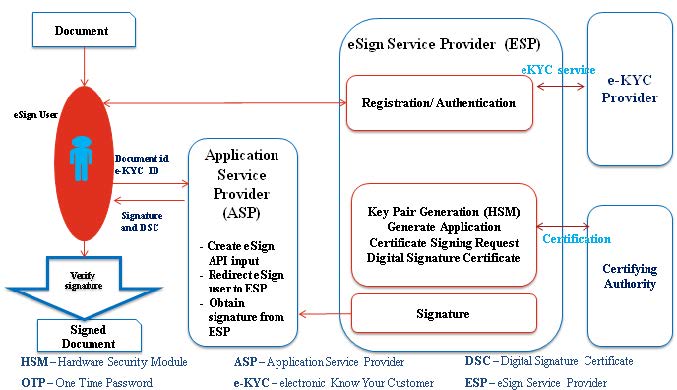
e-KYC Services Providers applicable for eSign:
- UIDAI (Online Aadhaar e-KYC services)
- eSign user account with CA (based on Offline Aadhaar e-KYC, Organizational KYC, or Banking e-KYC)
In this implementation, we are using UIDAI services for authentication as part of the Aadhaar eSign service workflow.
e-Authentication Technique using Aadhaar e-KYC Services:
- Aadhaar-eKYC – OTP: This class of certificate is issued for individual use based on OTP authentication through Aadhaar e-KYC. The service takes an Aadhaar number and sends an OTP to the Aadhaar-registered mobile number. The certificate confirms that the information in the Digital Signature certificate provided by the subscriber matches the information retained in UIDAI databases for the Aadhaar holder.
- Aadhaar-eKYC – Biometric (FP/Iris): This class of certificate is issued based on biometric authentication through Aadhaar e-KYC. The service takes an Aadhaar number, captures fingerprint/iris/face using Aadhaar-registered biometric devices, and validates it against Aadhaar records. The certificate confirms that the information in the Digital Signature certificate provided by the subscriber matches the Aadhaar holder information retained in UIDAI databases.
Implementation of Aadhaar-eKYC – Biometric (FP/Iris):
To perform biometric authentication, the user must install the RD (Registered Device) service application for the device and integrate Aadhaar APIs with required configuration details. This is a key part of implementing an Aadhaar eSign service flow in Android apps.
Below are some Aadhaar registered Biometric devices:
- Mantra MFS100
- Secugen
- Morpho
- Startek
- IDENTI5
Steps to perform Authentication:
The RD service typically exposes two primary actions that can be called via intent requests:
- Device Information: Returns RD service status (READY/NOTREADY). Request format:
Intent intent = new Intent(); intent.setAction("in.gov.uidai.rdservice.fp.INFO"); startActivityForResult(intent, 1); - Capture Biometric: The capture call is a blocking call and only one client can call it at a time. Request format:
Intent intent2 = new Intent();
intent2.setAction("in.gov.uidai.rdservice.fp.CAPTURE");
intent2.putExtra("PID_OPTIONS", pidOption);
startActivityForResult(intent2, 2);
PidOption is an input required to generate PID-Data and is typically provided in XML format.
PID-Data is the response block that is used to obtain a verified, signed certificate to sign the PDF document as part of the Aadhaar eSign service workflow.
Summary:
A digital signature confirms the integrity of signed data. It ensures the information originated from the signer and was not altered, proving the identity associated with the signature. Any change made to signed data invalidates the signature.
For more details about such case studies, visit us at www.corecotechnologies.com and if you would like to convert this virtual conversation into a real collaboration, please write to [email protected].
Supriya Mhaishale
Software Engineer
CoReCo Technologies Private Limited


